EVENT INTELLIGENCE PLATFORM

Bring every part of your event together.

Create the event, invite your list, see the expected headcount, check everyone in and keep the relationship for next time. One platform, one guest list.

The Free plan needs no card and never expires.

Comparing platforms? The full comparison is further down.

01Create your event

A page for your event, ready in minutes.

Every event gets its own page on Vantage with registration, tickets and a share card. Sell tickets or take free registrations, and payouts go to your own Stripe account.

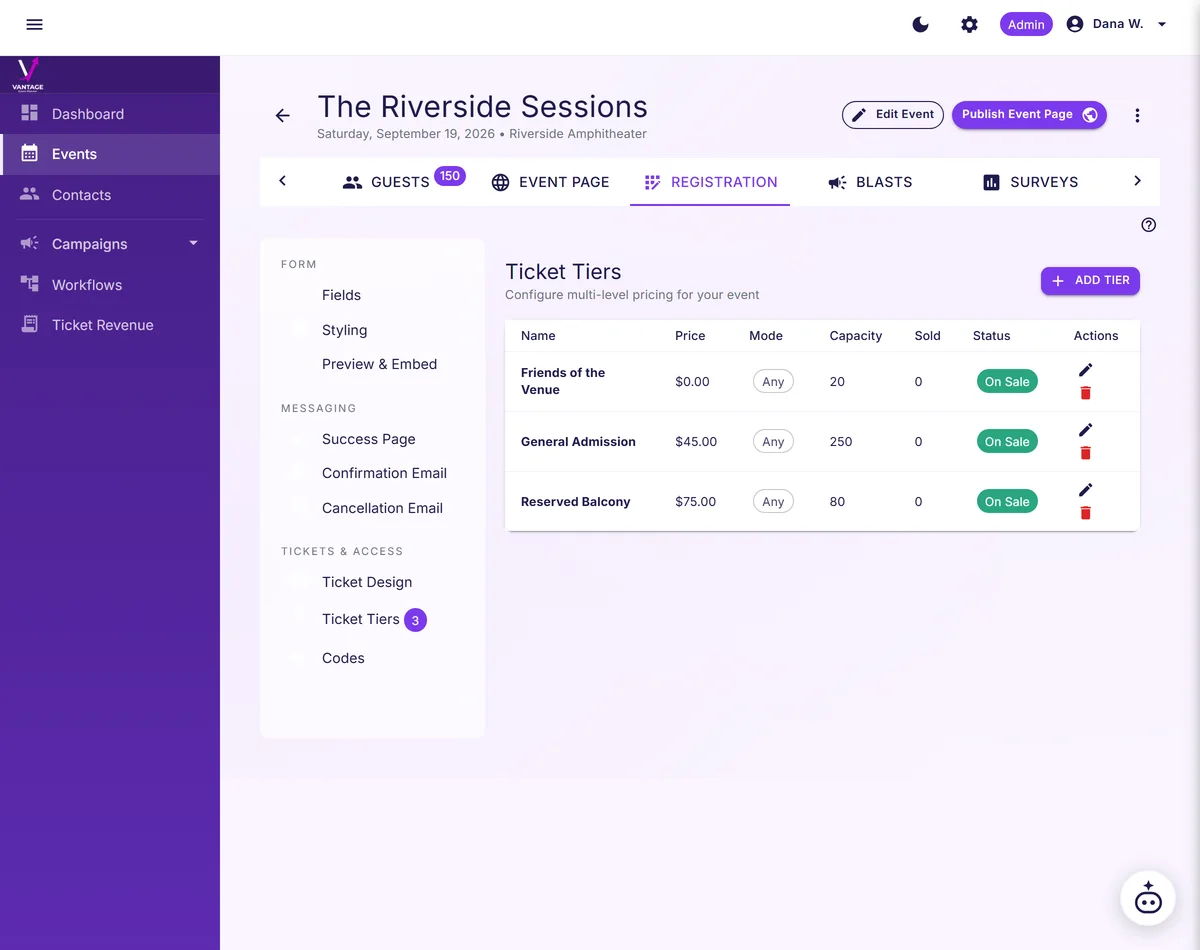
  • Free and paid tiers on the same event, each with its own capacity.
  • QR tickets carry each guest from registration to the door.
  • A Vantage address on every plan, including Free.
Ticket tiers table organizes Friends of the Venue, General Admission, and Reserved Balcony prices and capacities.
Make ticket choices clear and pricing easy to manage.
Ticket Revenue report with sales totals, refunds, platform fees and net per event
See ticket sales, refunds and your net in one report.

02Invite your guests

Right words, right time.

Ask the Co-Planner for an invitation or a reminder and it drafts one from your event's details. You edit it, then send it under your name.

  • One draft per message for one credit. Nothing sends until you press send.
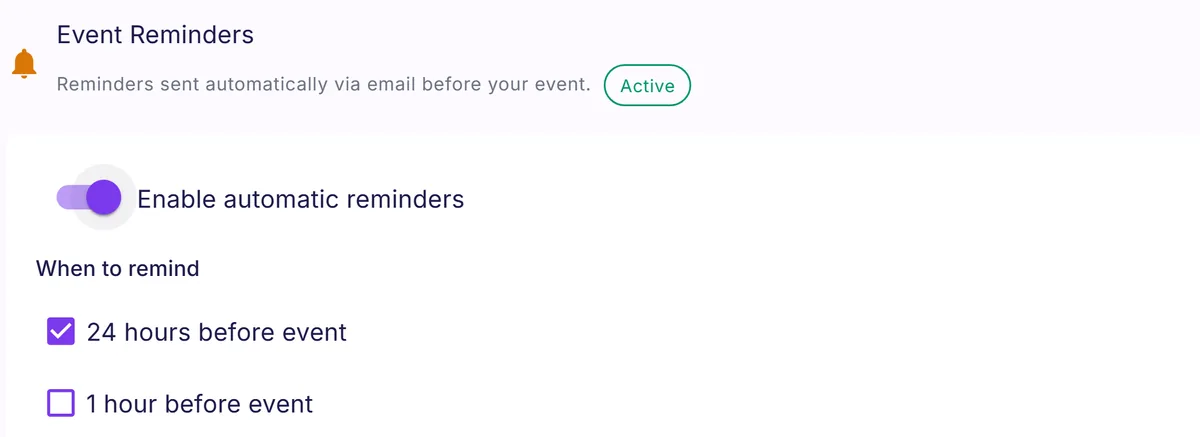
  • Automatic email reminders 24 hours and 1 hour before the event, once you turn them on.
  • Bulk SMS on Growth and above, through your own SimpleTexting account.
Vantage has automatic reminders enabled for 24 hours before an event.
Give registrants a helpful reminder before the event.
Communications
COMMUNICATION & ENGAGEMENT

Communicate with your event audience.

Email, SMS, livestream, surveys, and automatic reminders. All built in.

Drag-and-Drop Email Editor

GrapesJS-powered visual editor with your tenant branding baked in. Build beautiful campaigns without touching code. Pro+

Email Template Library

Start with six templates for each kind of event, from registration opening to the thank-you. Open one in the composer and make it yours. Growth+

SMS Campaigns

Send SMS blasts via your own SimpleTexting account with merge tags and automatic STOP opt-out handling. Growth+

Livestream Embed

Embed YouTube, Vimeo, or custom streams on your public event page with registration-gated viewing. Pro+

Survey Builder

Post-event surveys with NPS, star ratings, yes/no, and multiple choice. Results dashboard with visual breakdowns. Pro+

Automatic Reminders

Automatic reminders 24 hours and 1 hour before the event, feedback requests after it, and scheduled campaigns. Every plan

Custom Workflows

Respond to guest activity away from your keyboard: send the email or SMS you wrote when guests register, check in, cancel, or a waitlist seat opens, with optional delays and guest details merged in. Pro+

Multi-Tier Ticketing

Set multiple ticket tiers with per-tier attendance modes (in-person, virtual, or both). You set the prices, including free tiers. Growth+

Past registrants and future prospects, organized.
Add contacts by hand, CSV import or API. Repeat attendees are matched by email, so each person carries their history. Rank guests by real behavior after doors. Send filtered campaigns with scheduled reminders.
The contacts list showing registrants and prospects together, with a status chip beside each name.
Keep past registrants and future prospects in one list.
See past campaigns, their numbers, and duplicate one in a click.
Review campaigns by name, subject, date, and counts: sent, failed, delivered to the recipient's mail server, and bounced. View read-only statistics or duplicate campaigns as unsent drafts, preserving subject, body, and audience. Campaigns sent after 2 September 2026 show sent, failed, and unsubscribed counts. See each campaign's exact unsubscribe count from its link, including mail-app one-click unsubscribes. Enabled reporting adds delivery, bounce, spam-flag, open, and click stats, with opens estimated.
Make live attendance count.
Personal watch links count a guest as attended after a minute on the live stream, feeding your show rate and guest ranking.

03Plan for the room

Know how many will show up, before you pay for the room.

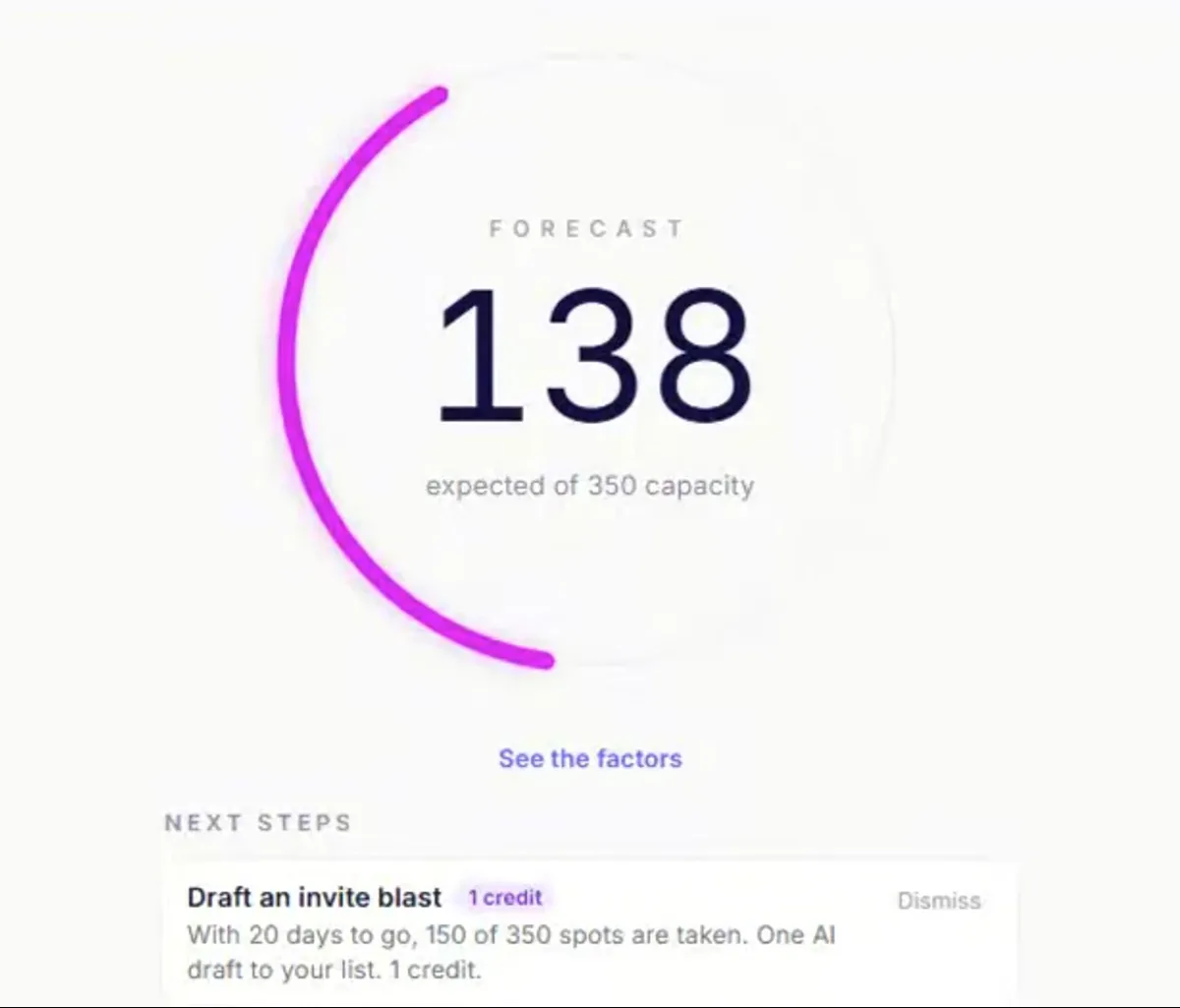
As registrations arrive, Vantage shows your current expected attendance against capacity, with the factors behind the forecast. Forecast attendance within 3%a as it learns your events. Use the next-step cards to spot guests who may not attend, then have Co-Planner draft a personal reminder for you to review and send, which can help more attend.

  • A number, a range and the factors behind it, on every plan including Free.
  • Next steps ranked for your event: 1 Vantage Point on Free, 6 on Growth, 15 on Pro, all on Business.
  • Velocity Scan reads your registration pace and projects the sellout.
The event overview forecasts 138 expected of 350 capacity, with a next-step card.
Know when to send the next invite and keep registrations moving.
Vantage Forecast
AI-POWERED

Vantage Forecast

Vantage Forecast predicts how many people actually show up, days before doors open, so you order the right amount of food, staff the right number of volunteers, and walk in confident. Vantage Forecast analyzes registration velocity, weather, drive time, past behavior, and over 50 available Vantage Points to predict who will actually show up.

Vantage Points

Get attendance predictions days or weeks before your event. The model factors in repeat attendees, repeat no-shows, geographic distance and drive time, registration timing and pace, weather, day of week, seasonal patterns, and historical patterns, so you plan with real data, not gut feel.

Know who needs attention next, before your event loses momentum.

Improves Over Time

Important: Prediction accuracy increases as you host more events. Your first few events establish the baseline. Each subsequent event makes predictions more accurate for your audience.

Historical Analysis

Vantage learns from your event history: no-show rates, cancellation patterns, registration sources, and seasonal variations.

Real-Time Updates

Predictions update automatically as new registrations come in, giving you up-to-the-minute attendance forecasts.

How Forecast Works

STEP 1
Data Collection

Vantage tracks registrations, cancellations, actual attendance, and location data from all your events.

STEP 2
Pattern Recognition

The model identifies patterns: time of day, day of week, event type, registration timing, and historical no-show rates.

STEP 3
Prediction Generation

The model generates attendance predictions with confidence intervals, updating continuously as the event approaches.

STEP 4
Continuous Learning

After each event, Vantage compares predictions to actual attendance, refining the model for even better accuracy next time.

Velocity Scan

What Velocity Scan Tracks:

  • Registrations per hour/day/week
  • Cancellation rate trends
  • Time-to-capacity projections
  • Peak activity patterns
  • Registrations by source
  • Geographic distribution
  • Demographic breakdowns
  • Momentum against the previous 7 days
  • Registered count against capacity
REAL-TIME ANALYTICS

Velocity Scan

Are you going to sell out or fall flat? Velocity Scan tells you in real time, and tells you what to do about it. Stop refreshing spreadsheets and start making moves.

Registration Momentum

See if registrations are accelerating or slowing down compared to your historical averages and similar events.

Sellout Predictions

Get early warnings when you're trending toward selling out, or falling short of capacity.

Actionable Vantage Points

See registration pace, then ask Co-Planner how your event is filling. It answers from live numbers: "nearly full, consider opening a waitlist."

Smart Alerts

Get notified when registration velocity changes significantly. No more constantly checking dashboards.

On event day: Arrivals

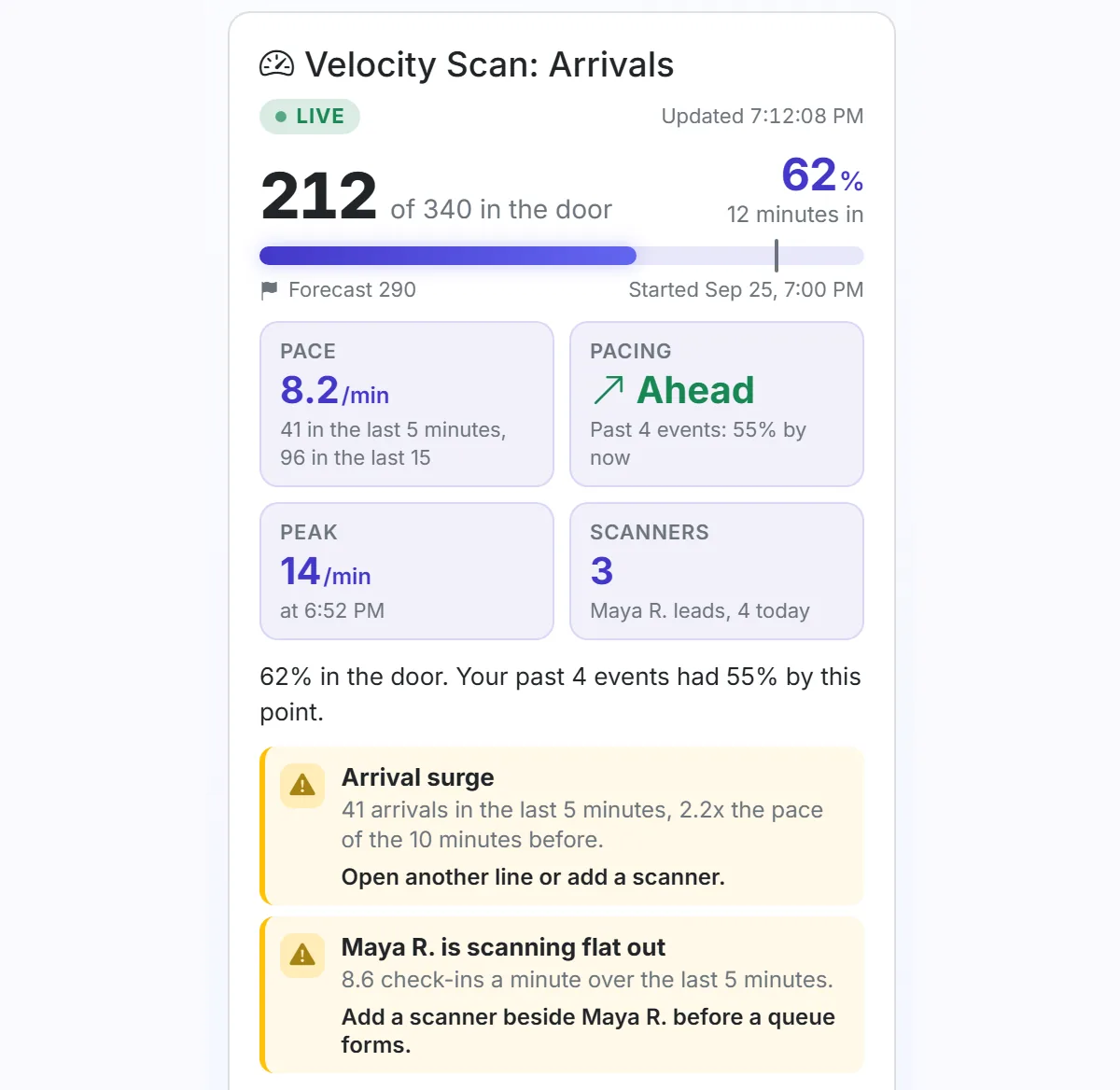
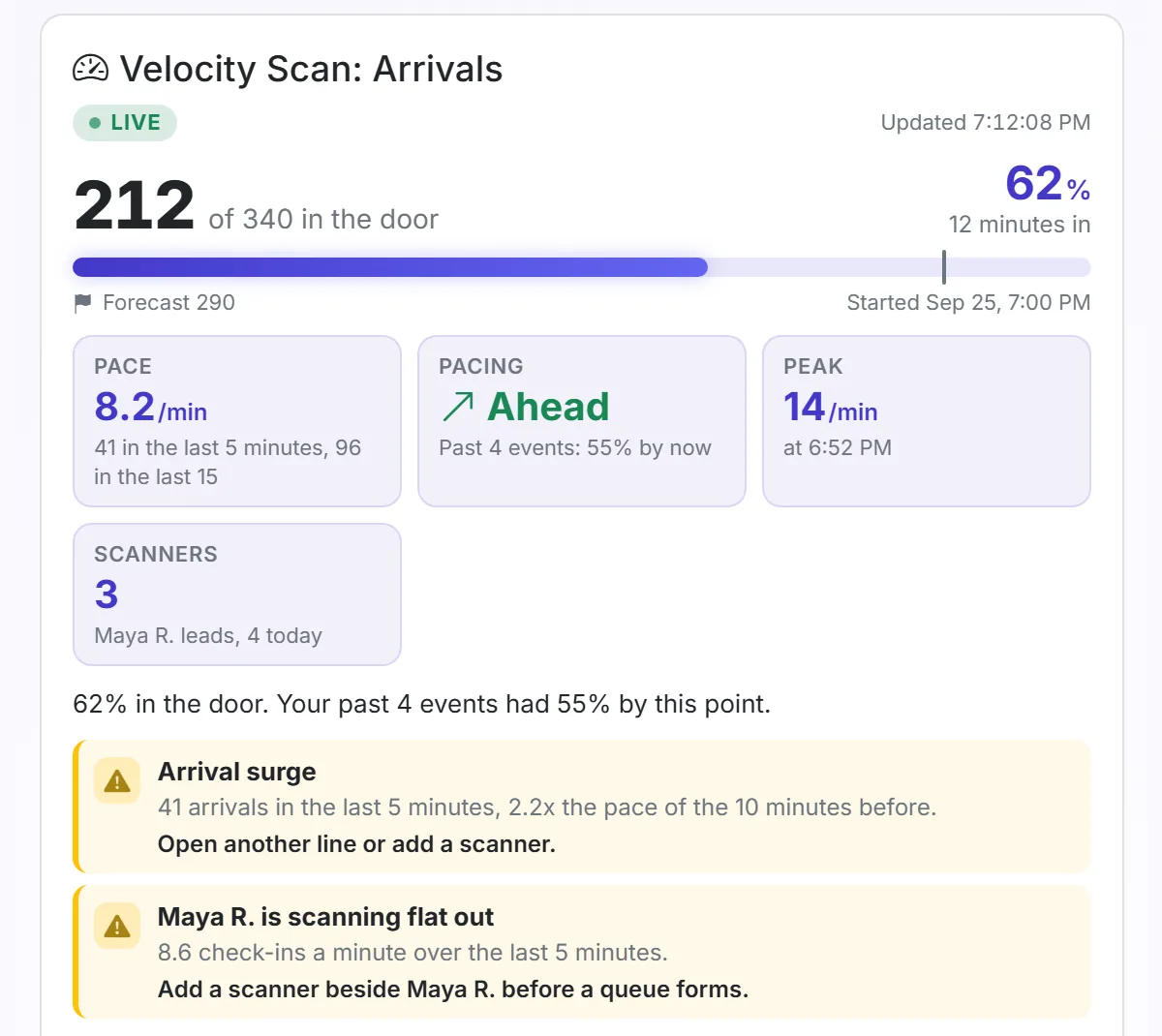
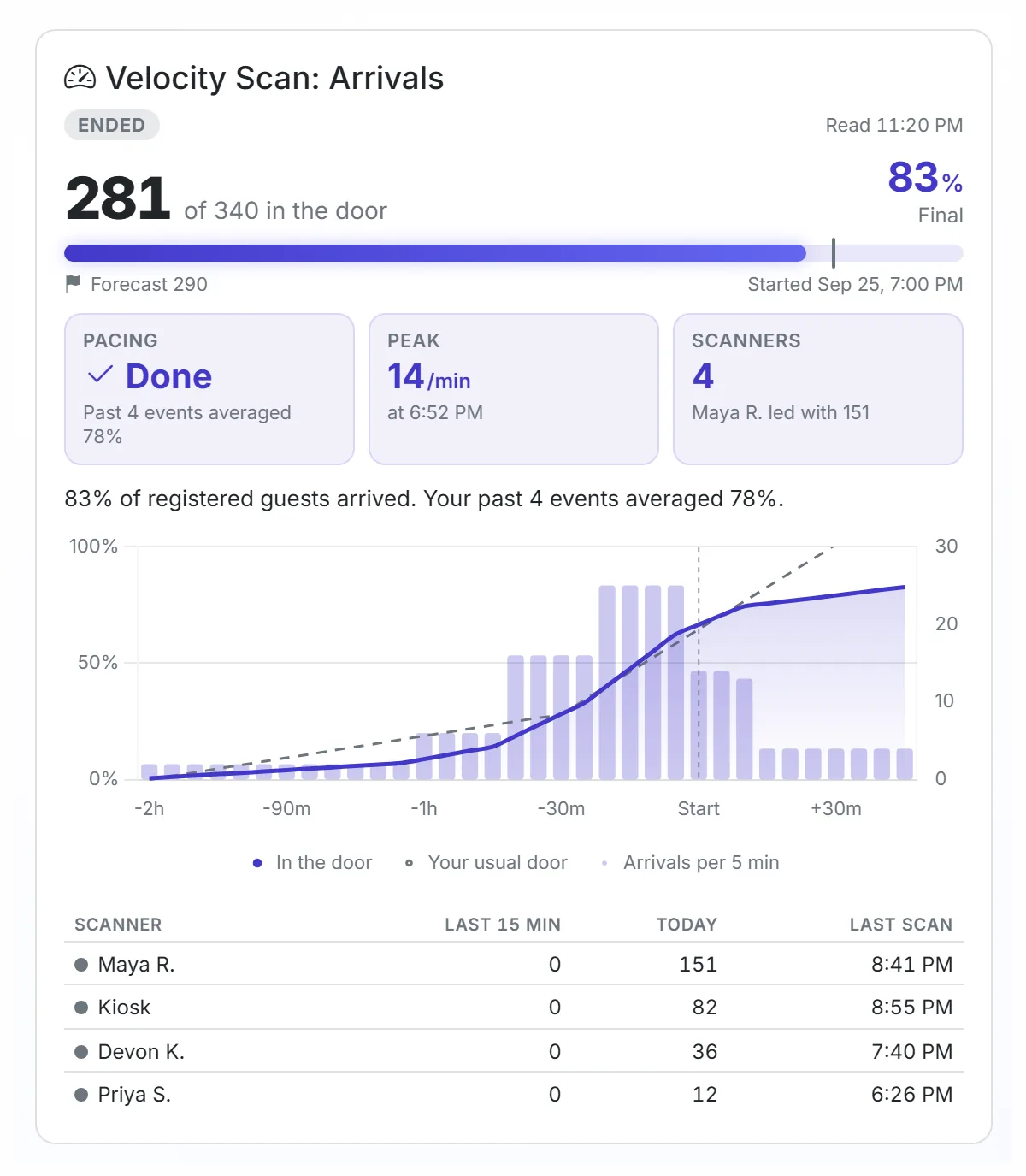
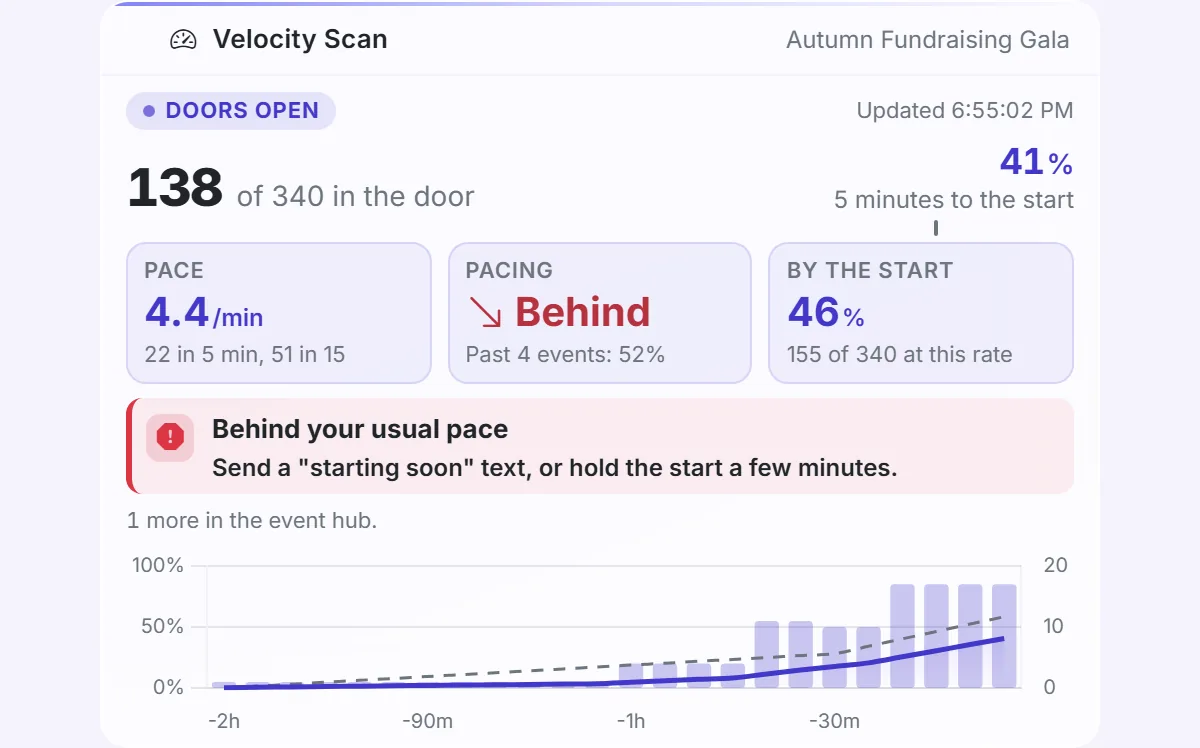
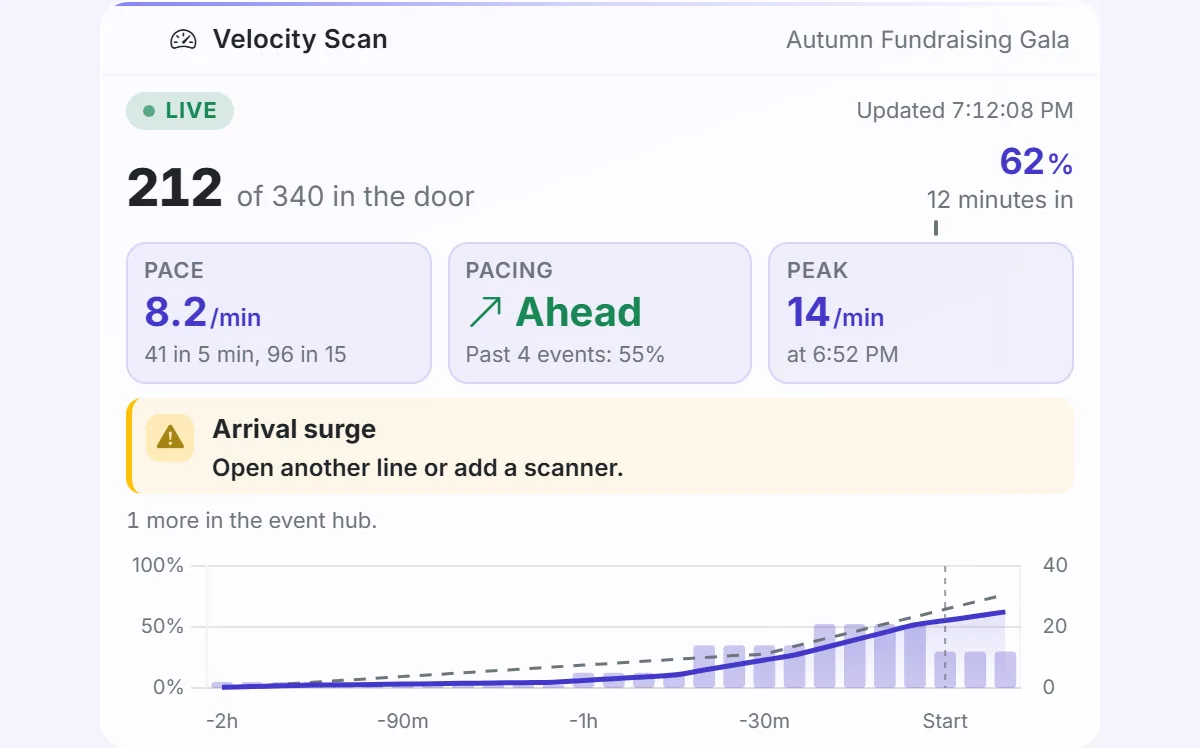
When doors open, Velocity Scan follows the door instead of registrations: who is in against who registered, check-ins per minute, and whether you are ahead of or behind your own usual pace.

What Arrivals shows

  • In the door against registered
  • Check-ins per minute
  • Ahead or behind your usual pace, from your own past events
  • Flags on the card when the door needs a hand: an arrival surge, arrivals stopped, one scanner carrying the door
  • Each scanner's count, in the event hub
  • On every plan, including Free
Velocity Scan: Arrivals card on a phone screen.
The same view on the phone in your hand at the door.
Velocity Scan: Arrivals card for a gala, with the door count, check-in pace and flags.
Arrivals shows who is in, how fast, and when to open another line.
Velocity Scan: Arrivals card after the event, with the final door count beside the forecast.
When the night ends, your final count sits beside your forecast.
Dashboard card on event day showing arrivals behind the usual pace, with advice on the card.
Behind your usual pace, and what to do about it, on one card.
Dashboard card on event day showing arrivals ahead of the usual pace.
Ahead of your usual pace.

04Welcome everyone

Check everyone in from any phone.

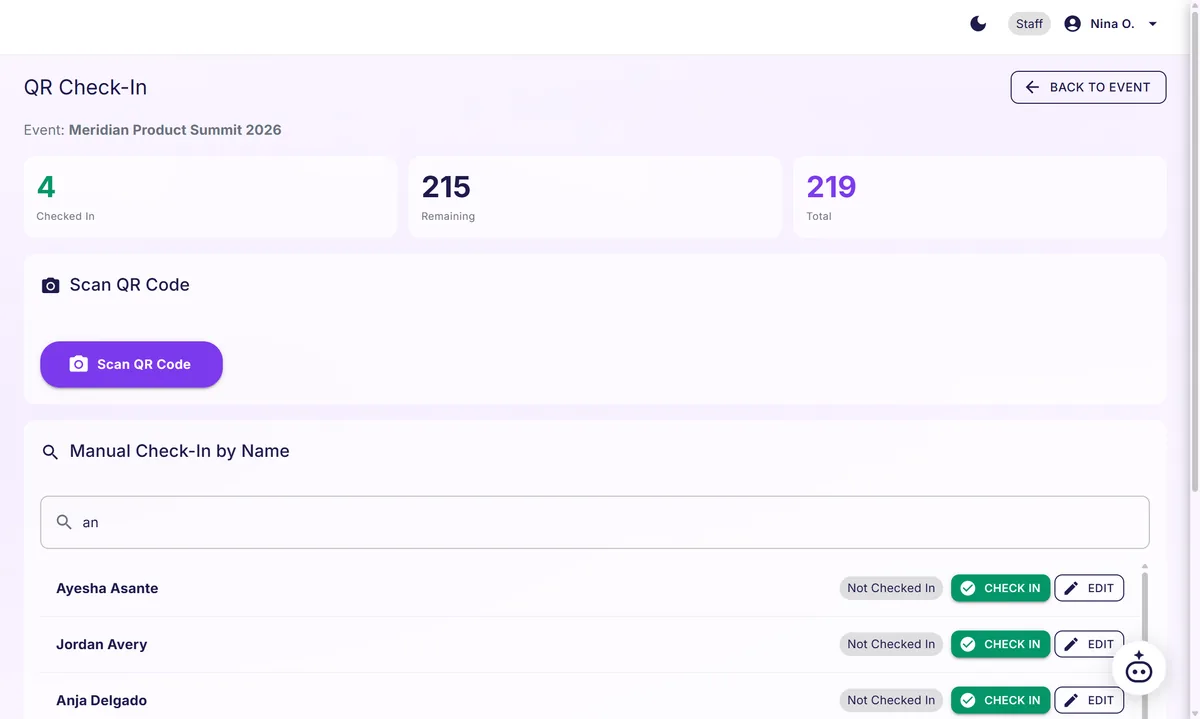
Scan the QR ticket or type a name. Your door staff see who has arrived, and their screens never show a guest's email or phone.

  • Works in any phone browser, with no app to install.
  • Badges print as guests check in, on Growth and above.
  • Multi-stop check-in counts every checkpoint of a trip or a tour.
  • Works offline: scans queue locally and sync when connection returns.
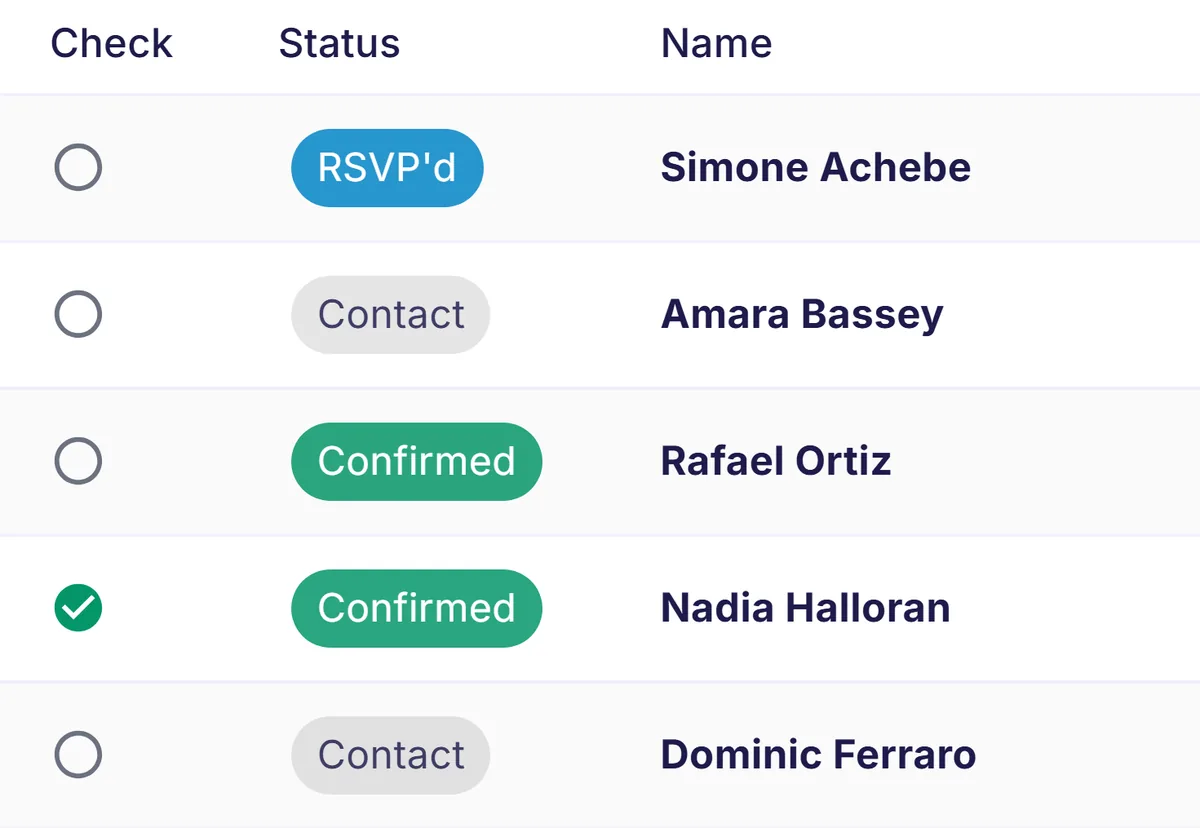
Staff check-in screen shows attendance counts, a Scan QR Code button, and guest names with check-in controls.
Confirm each arrival quickly and keep the welcome line moving.
Instant check-in
SEAMLESS EXPERIENCE

Instant Check-In

First impressions matter. Your attendees scan a QR code, get a professional badge, and they're in. No lines, no fumbling, no "can you spell your last name?" Just a smooth start that sets the tone for everything after.

QR Code Check-In

Give each registrant a unique QR code by email, or a link by SMS to open it. Staff scan codes with any smartphone or tablet.

Professional Name Tag Printing

Design and batch-print directly from your browser. Supports all popular Avery templates (5395, 5390, 5392, 74540, 8522, and more). Live check-in monitor auto-prints name tags as guests arrive.

Badge workstation previews Avery 5395 name badges with layout and typography controls.
Get clear name badges ready before guests arrive.

Walk-In Registration

Someone shows up unregistered? They register at the door and go straight into the guest list, same as everyone else.

Offline mode.

Wi-Fi unreliable at your venue? Registrant data is cached on-device. Check people in with zero internet. Everything syncs automatically when connection returns. Your event never stops. Works offline: scans queue locally and sync when connection returns.

The Check-In Experience

1

Attendee Arrives

Shows QR code from email/SMS or provides name

2

Staff Scans

Uses smartphone/tablet to scan code (or search by name)

3

Badge Prints

Professional badge prints instantly (optional)

✓

Done!

Attendee is checked in, badge in hand. < 10 seconds total.

What's Included

  • • Unlimited QR code generation
  • • Unlimited check-in devices
  • • Real-time attendance tracking
  • • Duplicate check-in prevention
  • • Walk-up registration support
  • • Badge template customization
  • • Export check-in data (CSV, Excel) with Pro and above
  • • Offline sync capability

Supported Hardware

  • • Any iOS or Android smartphone
  • • Tablets (iPad, Android, Windows)
  • • Desktop computers with webcam
  • • Dedicated barcode scanners
  • • Any thermal or inkjet printer
  • • Avery label sheets (various sizes)
  • • Self-service kiosks (optional)

More than one stop?

Field trips, tours and walk-a-thons check people in at every point along the way.

Multi-stop check-in
MULTI-POINT CHECK-IN

Roll-call for seminars that move.

Multi-room training programs. Multi-day offsites. CE programs across multiple session rooms. Civic engagement tours. The forecast tells you who registered. GPS multi-point check-in tells you who showed up at every room, every session, every stop. GPS-verified. Audit-grade. Every scan timestamped and exportable. Attendees never located.

Multi-stop runs on any event, not just field trips. Each stop stamps its own scan-in and scan-out, so the export carries minutes present per session, and the roster takes the columns you define: license number, course code, whatever your program has to file. Keep every off-list or unreadable scan as an event record, including wrong-event, unknown-code, and malformed scans. Your organizer report groups them, so you can answer "was that one confused guest, or thirty?" after the event.

  • Multi-stop sessions: each leg has its own roster and missing list.
  • GPS-stamped scans: latitude, longitude, accuracy, and timestamp on every record.
  • Live map: pinned destinations and color-coded scans by session.
  • Privacy-first: organizers consent up-front per event. No two-way location with attendees.
  • Every scan timestamped and exportable.
Staff check-in screen shows attendance counts, a Scan QR Code button, and name search with check-in controls.
Confirm each arrival quickly and keep the welcome line moving.

Canonical use case: corporate and public service seminars. The same capability also serves K-12 field trips, summer camps, tour operators, and sports tournaments.

HOW IT WORKS

GPS captured at the moment of scan, never between scans.

See pinned destinations and discrete scan events on a map, not continuous walking paths.

The operator picks the destination at every leg. The system records what happens.

05Keep it going

Every event teaches the next one.

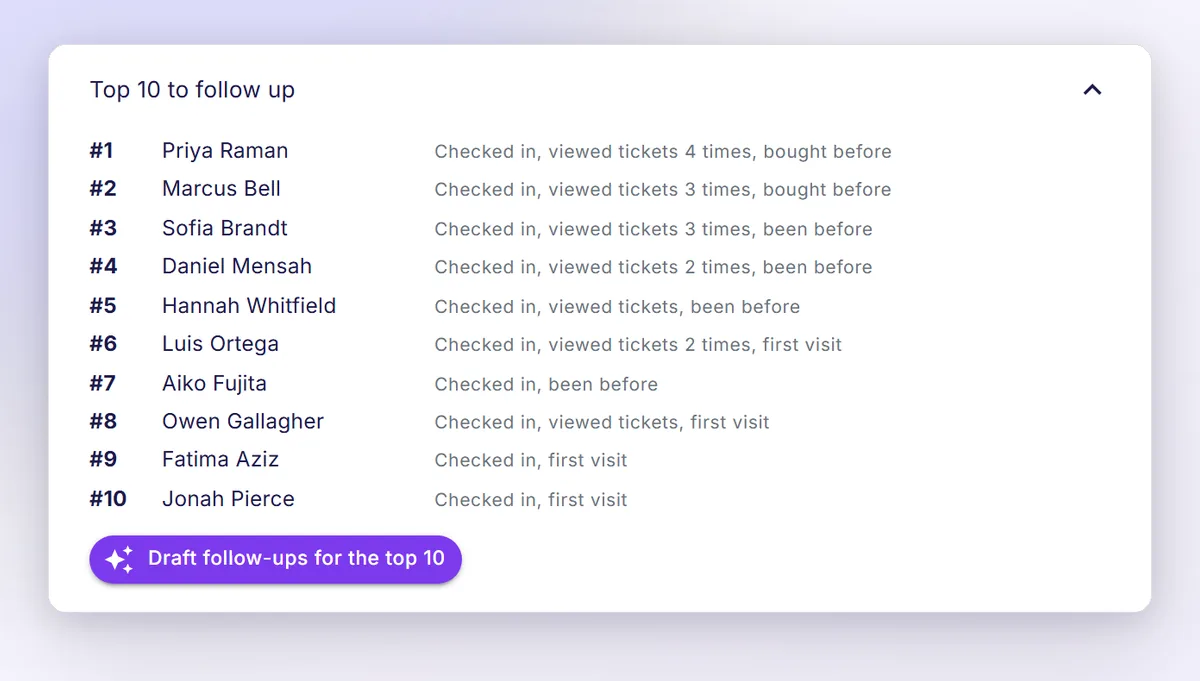
Attendance, check-ins and follow-up stay with your guest list. Vantage ranks who to follow up with, drafts the message and uses your event history for the next forecast.

  • Attendance Rank shows who came, how they engaged with your pages, and who has been before.
  • One follow-up draft per guest, one credit each. You review and send.
  • Your own event history sharpens the forecast from your third closed event.
The top ten guests to follow up, what each did, and one button to draft their follow-ups.
Start your follow-ups with the guests who showed up.
The event lifecycle
EVERY STAGE OF THE EVENT

From the first registration to the post-event follow-up, mapped stage by stage.

Five stages every organizer runs. Two very different outcomes.

Stage Without Vantage With Vantage What you earn
Two weeks out Registration count is the only number on the dashboard. Booking decisions are gut-feel. Vantage Forecast recalculates on each open from current registrations. Predicted attendance plus confidence range. Right-sized venue. Catering planned against a number, not a hope.
Three days out Generic reminder blast to the whole list. Hope it lands. Co-Planner identifies high-no-show-risk registrants. Drafts personalized reminders for that segment. Show rate lifts measurably. The room reads packed instead of half-empty.
At the door Paper sign-in. Bottleneck at the badge table. Event starts late. Live Check-In turns any phone into a check-in terminal. Scan QR codes quickly, one attendee at a time. Event starts on time. Attendees walk in feeling the event is run by pros.
During No visibility into pacing. No way to course-correct mid-event. Real-time arrival pacing against the forecast. Live check-in feed as guests arrive, with every off-list scan recorded on the event. Anomaly alerts surface in the dashboard. Mid-event corrections happen. Sentiment lifts because someone surfaced the data in time.
Within the hour of close Manual follow-up later, if at all. Hot leads cool while you do the cleanup. AI-drafted personalized follow-up for every attendee, ready before the venue lights come up. Co-Planner drafts it in your voice. You review it and send. Higher conversion to the next-tier offer. Revenue captured while interest is at peak.
Same room, 19 more attendees
A SCENE FROM THE FIELD

Same room, 19 more attendees.

A 350-seat innovation summit. 347 registrations on the page. Without a forecast, the organizer would hope for roughly 308 attendees, the historical 89% show rate.

Vantage Forecast flagged 24 registrants three days out. Ticket views had stopped, registration timing was late, and none had confirmed.

The Co-Planner drafted personalized reminders for those 24. The organizer reviewed them in two minutes and hit send.

19 of the 24 walked in.

Final count: 327 attendees. 94% show rate. Same 350-seat room. 19 more attendees per event than the no-forecast posture would have produced.

The forecast itself was accurate within 2% of the post-intervention number.

Vantage Forecast and the Co-Planner work together: the forecast names the registrants, the Co-Planner drafts the message, the organizer makes the call to send.

What are you bringing people together for?

Compare the platforms.

Advertise on other platforms. Promote and manage events on Vantage.

Vantage Eventbrite Luma Zoom Webinars StreamYard Bizzabo Cvent
Pay less in monthly fees Free plan never expires; Growth $39/mo, Pro, Business Free to publish; Pro email marketing from $15/mo Free; paid plan $59/mo billed annually $83.33/mo billed annually per user, plus a Workplace Pro seat Free; Core $35.99/mo annual, individual use $499/user/mo, 3-user minimum, from $17,999/yr Professional and Enterprise: quote only; free to build; pay per registration
Keep more of your ticket revenue 3% platform fee plus processor fees; proceeds go to your own Stripe 3.7% + $1.79 per ticket + 2.9% processing, US paid tickets Free: 5% + Stripe; paid plan: 0% + Stripe Take rate not found Not a ticketing product Not found Payment fee set in your contract; no percentage published
Host live events easily Add speakers to the stage from your guest list; one click creates the YouTube Live broadcast on your channel Pasted meeting links; paste a YouTube link Google Meet or Zoom on the host account; paste a link Promote to panelist, Backstage on Webinars Plus; native RTMP to YouTube Greenroom, host adds to stage; YouTube is the primary destination Bring attendees on stage, Virtual add-on; YouTube not found Attendee Hub live and simulive streams; on-stage and YouTube not found
Predict the turnout before the doors open Forecast attendance within 3% as it learns your events, every plan1 Not found Not found Not found Not found Not found Registration Predictions: counts with ranges; in design, not released
Keep the door moving Staff scanner on any phone; walk-ins register at the door Organizer app scans QR Web or app scanner Not found Not found Onsite Command App OnArrival scans QR
Allow attendees to check themselves in Guests type their name on a tablet at the door and check themselves in. Every plan. Not found Not found Not found Not found Not found Self-serve check-in with QR (OnArrival)
Print badges at the door Seven Avery templates; badges print automatically as guests check in, Growth and up Ticket printers, not badge printing Built-in badge printing unavailable, per Luma Not found Not found Custom badge printing, Advanced Onsite On-demand badge printing (OnArrival)
Manage contacts and follow-ups together Native lightweight CRM & workflows Fixed reminders; custom rules and CRM need Zapier or another subscription Fixed reminders; custom rules and CRM need Zapier or another subscription Requires outside subscription and integration Not found Requires outside subscription and integration Salesforce, HubSpot, Marketo integrations; own CRM not found
Free plan that never expires Yes, never expires, 25 events, 250 guests each Yes, free events unlimited Yes, free forever Webinar license unavailable on Free Yes, watermarked Free plan unavailable Free to build; pay per registration to launch; expiry not stated
Check guests in with no signal Offline QR check-in built in: the guest list downloads once, scans queue on the phone and sync when you reconnect, every plan Not found Not found Not found Not found Onsite Command app checks in and prints badges offline OnArrival checks in and prints badges offline once the event is downloaded to the device

"Not found" means the vendor's own pages do not describe it; not a no. Prices are vendor-published list prices as of August 2026. Cvent publishes no list price, so its price cells say quote only. Payment processing fees apply on every platform that sells tickets.

Cvent alternatives · Bizzabo alternatives

Related: How Vantage Works: Guides to Every Feature

Have an Eventbrite list? Start with what you have.
Import an Eventbrite attendee CSV at any time. Vantage auto-creates the event from the file.
Give your AI assistant a key to your event data.
Give your AI assistant scoped access to registrants, contacts, events, attendance forecasts, email activity, and campaign results. It can add contacts and update preferences, but never send email. Set each key's scope in Admin and revoke it with one click.
Advertise on Eventbrite. Plan and communicate on Vantage.
Eventbrite is where people find your event and buy tickets. Keep that. Import the attendee CSV into Vantage and the event is created from the file. Then forecast turnout, send email reminders, check guests in by QR even when the venue wifi dies, and rank them by what they did after doors. Tickets sold on Vantage pay out to your own Stripe account.

Event promotion: help people find your event.

Your event page has its own address, built for search.
Every event page has its own web address. Once you publish, search engines are allowed to index it, and Vantage keeps it in a sitemap they read.
Your page carries the details Google reads for event results.
Public event pages carry the event details Google reads for its event results: name, dates, place or online, and ticket availability. Give the event a venue and the page is eligible. Google does not cover online-only events there, and decides whether an eligible page appears.
Paste the link and it shows up as a card.
When someone pastes a published event link into a text, chat, email or social post, it opens as a card with the event's poster, title and description.
Share your event page from the page itself.
One tap opens the share sheet on a device that has one. Where a browser has none, the link is copied to your clipboard and the card is shown, so you can see what recipients will get.
Put an event card on your own website.
Add a compact event card to your website, or a full registration form. Its confirmation step offers add-to-calendar links for Google Calendar and other calendar apps.
BEING BUILT
Coming: post events to Mastodon and other social accounts through Zapier.
Coming: once the Zapier app is published, a Zap you build will post each event you publish to Mastodon or other social accounts, once per event, carrying its public link, poster image and start time.
Coming: bring Eventbrite registrations into Vantage with Zapier.
Once the Zapier app is published, a Zap you build brings each new Eventbrite registration into the Vantage event you choose.
BEFORE YOU ASK

Before you ask, here's what other organizers asked.

"Is Vantage Events event management software?"

Yes. Vantage Events provides event pages with registration, tickets paid out to your own Stripe account, QR check-in from any phone, email campaigns and reminders. It also forecasts attendance.

"Does the forecast actually work for new events with no history?"

Yes, with a wider confidence range. Year one runs on your event's registration velocity, weather, drive time, day of week, season and cancellations. Starting with your third closed event, your own history contributes to the forecast and carries more weight with each event after that, tightening the confidence range.

"What if I don't want to send AI-drafted messages?"

Don't. The Co-Planner drafts. You review and approve. Drafts that don't fit your voice get edited or skipped. Nothing leaves the platform without an organizer's send action.

"Do I need to integrate this with my existing CRM?"

Optional. Vantage exports CSV on Pro and above. CRM integrations are available on Growth and above. The Free tier runs standalone. No lock-in.

"How much of this is on the free tier?"

The Free plan needs no credit card: up to 25 events, 250 guests each, QR check-in, printable tickets, 2 AI credits a month, and one Vantage Point per event, the highest-importance signal the engine ranks. Vantage Forecast is on every plan, including Free. Growth at $39 a month gives you 6 Vantage Points per event, unlimited events, 500 guests per event and 8 AI credits a month. Pro raises that to 2,000 registrants an event, 25 AI credits and 15 Vantage Points.

Each organizer you invite gets 30 days of Pro free, no card required. The 30-day Pro trial is still open to them after that, for 60 Pro days in all.

"Does check-in keep working when the venue has no signal?"

Yes. Scans queue locally on the phone. The moment cell or wifi returns, scans sync and any opted-in SMS fires. Tested on actual airplane-mode phones every release.

RISK REVERSAL

Plan with data. Not with hope.

No credit card at signup. The Free plan is the default and never expires. When you want the full 15 Vantage Points behind each forecast and 2,000 guests per event, add a card and start a 30-day Pro trial. If the added depth isn't for you, cancel before day 30, pay nothing and keep Free.

Want the philosophy first? Read: What is Event Intelligence? →

Observed average error was 7.3% across three consecutive real events, improving with each event. Forecast attendance within 3% is the expected accuracy as the model learns from every closed event.