Use casesEducation

Real events. Hundreds of guests. Forecast attendance within 3%, improving with every event.

All 24 accounted for. In 30 seconds.

Headcount on demand, anywhere.
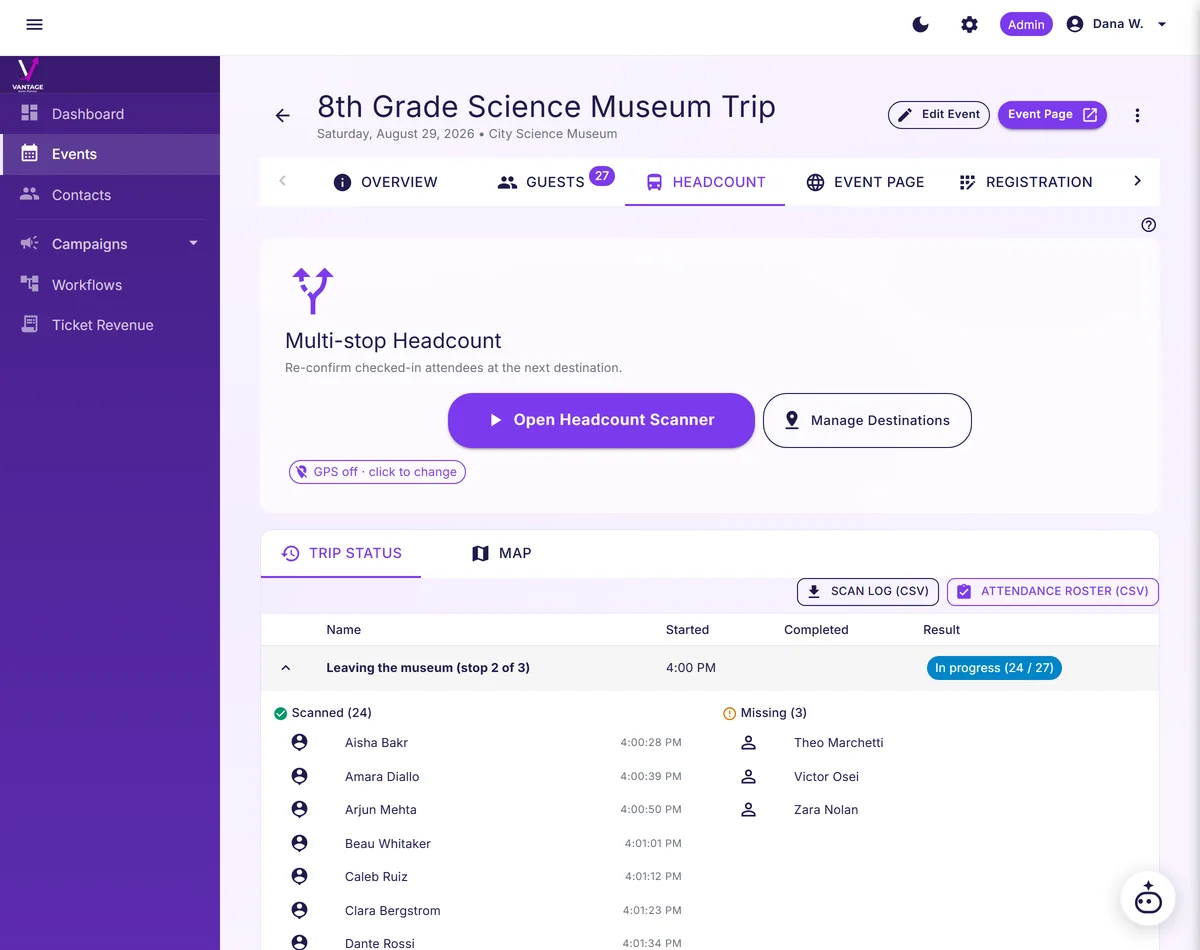
Multi-stop headcount screen showing which students have been counted at the current stop and which are still missing.
Tap Start Headcount.
Vantage takes a complete poll: every round is a fresh "who is here right now?" Phone camera scans QR badges as kids walk past. Badge torn or missing? Type the name. A live list shows who has not been counted yet. Tap any name to surface the kid's photo and seat assignment. The teacher sees who is missing instantly, instead of recounting from the start.
Late arrivals and early pickups handled automatically.
A student who joins late just checks in and appears in the next headcount, no false-missing alarm. A guardian picking up early triggers a checkout, removing that kid from later headcounts, no false-missing alarm there either. Two taps to mark a kid as "verified, off-trip" if a guardian picked them up early, and the teacher logs the pickup with the guardian's signature on the phone screen. The platform tracks who is supposed to be with the group right now, not who started the day. Accounted-for guardians can get a text.
Optional guardian SMS at every milestone.
Every parent gets a text the moment their kid was counted: "Hi Sarah, Jake was just counted at Museum departure for Lincoln Elementary Field Trip." Families hear progress as the day moves forward, without adding another task for teachers. Toggle on per headcount. The teacher names the moment ("Museum departure," "Lunch start," "Bus boarding"). After you finish a count, one tap texts each opted-in guardian of the students who were counted. Each guardian opts in independently, and STOP unsubscribes any single phone without affecting the others. Guardian SMS uses your own SimpleTexting account, connected on the SMS integration page; without it, the headcount completes but no text is sent.
Know who scanned a student, where, and when.
Every scan is timestamped with the staff member's name and the place it happened, so your team can review a count without second-guessing what happened. The trip leader stops being the only record. Timestamped, exportable, multi-tenant-isolated. Volunteers see names and grade only, never guardians or contact info.
Works in airplane mode. Works zero-bars.
Offline-first PWA. Phone in airplane mode at the bus stop? Scans queue locally and sync the moment cell service returns. The whole headcount flow runs offline: every scan is captured locally on the device, and the progress ring updates whether or not the phone has cell service. The moment the bus rolls back into a signal area, every queued scan and every guardian SMS fires. Scans that survive the museum basement: no lost data on the museum basement floor where the cell signal goes to die. The offline-first flow survives the actual hike. Works offline at the museum, on the bus, on the playground at the end of recess. We test on actual airplane-mode phones for every release. No "internet required" disclaimers.
Free tier for PTAs, classrooms, and student orgs.
CSV roster import. Headcount on demand. Audit trail. All on the Free plan, with no credit card. Paid tiers exist for districts running multi-school logistics or ticketed fundraisers at scale.
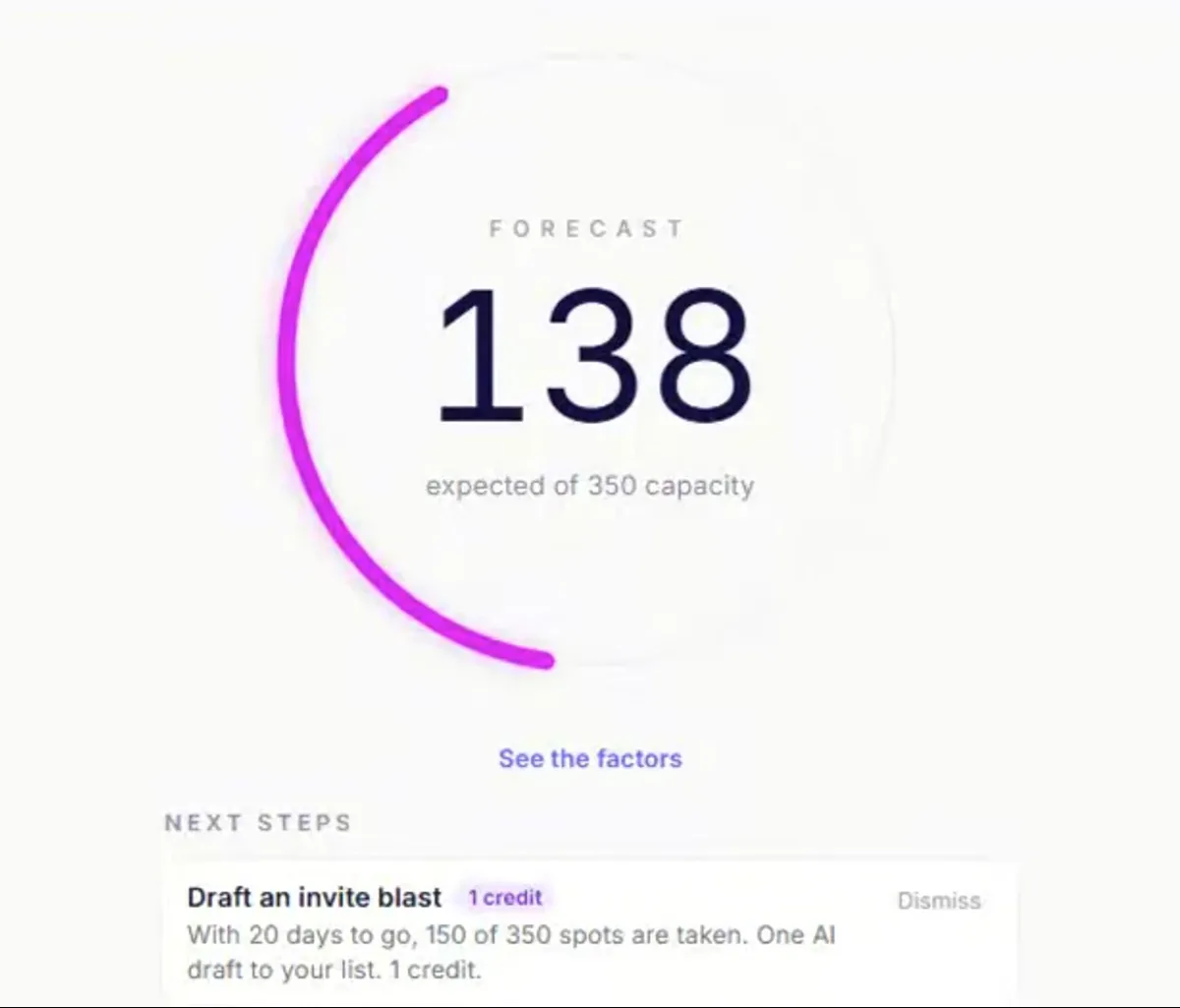
Forecast attendance within 3%
The attendance forecast estimates turnout within 3%a as it learns your events.
The event overview forecasts 138 expected of 350 capacity, with a next-step card.
Know when to send the next invite and keep registrations moving.

Before you ask, here's what other organizers asked.

What if a kid loses their badge?
Type the name. The headcount UI has a search field next to the scanner. Three letters in, the kid's name surfaces. Tap to count. The badge is a convenience, never a blocker. We tested this on field trips where badges arrive in pockets, on lanyards, in backpacks, in cafeterias, and in the bottom of buses. Type-name fallback is always one tap away.
What about kids with multiple guardians?
Each student record can have multiple guardians, each with their own SMS opt-in and phone number. STOP keyword unsubscribes any single guardian without affecting the others. Only guardians with the update opt-in set on their contact record get notifications. The setup happens once when the roster is imported.
Will the data leave the platform or be sold?
No. Student data is never sold, rented, or used for advertising. Your event data trains only your models, never another customer's. Multi-tenant data isolation, encryption at rest, audit log of every access. No data leaves the platform unless your school admin explicitly exports it. We document the posture in a one-page brief your district IT team can hand to the superintendent.
How does setup work?
Three steps. Create a Field Trip event in Vantage. Import the student roster from a CSV (with optional guardian contact info). Print QR-coded badges. Total time: about ten minutes for a class roster. No predefined stops. No required configuration. The trip's structure gets learned as you live it.
Is this FERPA compliant?
Vantage is built with role-based access, encryption at rest, and audit logging. Multi-tenant data isolation means one district's data never crosses with another's. School-side compliance still requires your district's own consent, retention, and disclosure policies. The platform-side posture is documented in a brief your district IT can review in one round.
Does this track kids between stops?
No. The platform records scans at each destination, with GPS captured at the moment of the scan. The trip leader sees the full scan log on the operator side. Guardians get the optional SMS milestone notifications they opted in for, but no live tracking map and no scan-by-scan dashboard.
Can we upload our class list?
Yes. Upload a CSV roster to create every student as a registrant. On Growth and above, print scannable QR badges for your whole class in one batch.